
Configure any Custom SMTP for warmup
E-Warmup supports any SMTP provider (self-hosted servers, other ESPs, etc.) via custom SMTP settings. This is perfect for providers without a dedicated integration.
Prerequisites
Access to your SMTP provider/server settings (host, port, credentials).
Valid SMTP username and password (or API key where applicable).
Valid IMAP
Step 1: Gather Your SMTP Details
Collect the following information from your SMTP provider (check their documentation or dashboard):
SMTP Host (e.g., SMTP Host or Server Host)
SMTP Port (commonly 587 for TLS or 465 for SSL)
SMTP Username (your email address, login, or username)
SMTP Password (your password or full API key)
Not sure about these?
if you are using any 3rd party SMTP Provider then check their Help Center or Documentation or contact them to get above SMTP details.
Self-hosted: Your server IP/domain and credentials
Note: You can bring any SMTP provider and connect to E-Warmup using this: Postmnark, Sparkpost, Sendx, Mailpipe, Mandrill,Ongage, Maropost, Campaigner, Expertsender, SMTP.com, Mailjet, Elastic email, sendpulse, amazon ses, GHL and many more.
Step 2: Gather Your IMAP Details
Collect the following information from your IMAP provider (check their documentation or dashboard):
IMAP Host (e.g., Server host or IMAP host)
IMAP Port (993 or 143)
IMAP Username (your email address)
IMAP Password (your password or full API key)
Step 3: Connect in E-Warmup
Log into your E-Warmup dashboard.
Go to the connection / add inbox section.
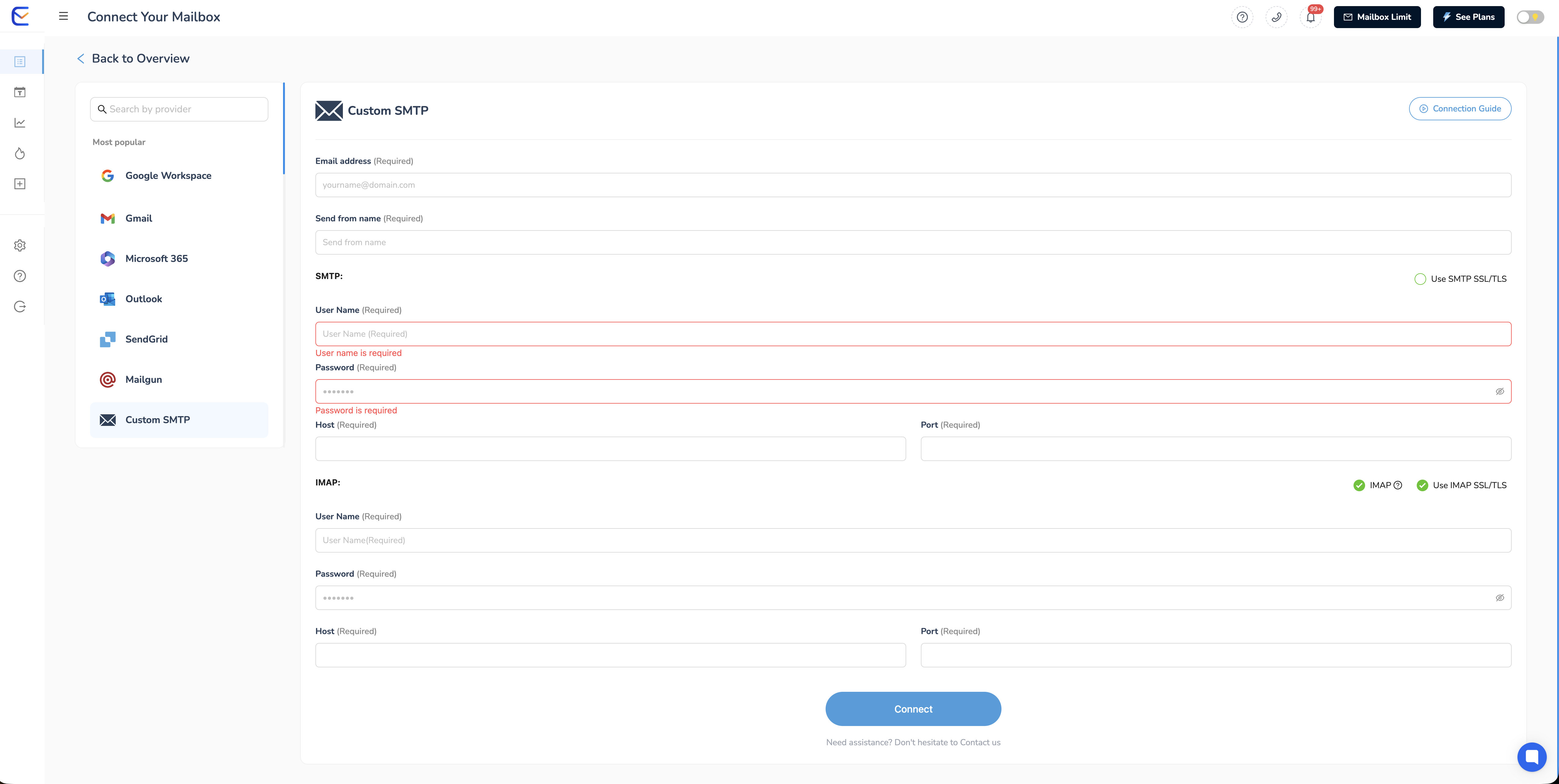
Select Custom SMTP (or Other / Manual SMTP).
Fill in the fields with your SMTP & IMAP details.
Connect.
DONE !!
P.S: If you are facing difficulties or not familiar with this technical setup, you can schedule a call with us or email at [email protected]